The new editors war
There is an old editor war that seemed to wane until 10-ish years ago; it was one of the most important discussions of the late 1980s and early 1990s on the Internet and you had to pick a side. I, for one, did not. I was never interested in this nonsense, and it is nonsense if you take it seriously.
The editors in question are vi and emacs, both enduring pieces of software that really saw their star shine bright, fade away, and shine bright once more. vi is created by Bill Joy in 1976 on a system with a keyboard that notoriously had the arrow keys mapped on the keys hjkl - it was an extension? reimplementation? of the ex editor. emacs was created around mid-70s and focused on extensibility. The name comes from Editor Macros because it was a collection of macros over the TECO editor, but we don’t care too much about this because we never saw ex or TECO working on our machines, and we really really don’t care that much about this piece of history.
What’s important is that they were created mid 70s, with the limitations and the know-how of the mid 70s. Vi never evolved significantly from the 70s modus-operandi - Emacs did. In fact, the current version of emacs, correctly named GNU Emacs is not a direct descendant of the original, but a free software alternative created by Richard Stallman in the 80s. Emacs evolved for a while, but waned, and a more courageous fork, XEmacs, picked up the pace. I occasionally used XEmacs in the early 00s, it was usable as a normal editor, and didn’t require as much getting used to as the default installation of GNU Emacs needed.
And my opinion about this editor war is that the worst editors in the universe were fighting for supremacy of who’s the best unusable editor, and I still think that up until 10-ish years ago, that was absolutely true. Of course, I’m writing this because my opinion changed, but before that, let me explain a bit about my editors in the 90s onwards, ever since I actually started using an editor.
Personal history, you can skip this
So, my contact with computers was done by either, 1, accessing the computer at my dad’s workplace, where they had Prince of Persia and started in me an obsession for computers, programming and games, and 2, reading books edited by the local Teora publishing house, which was translating badly books that were circulating in the west. There was no book to explain how to use an editor. I knew by heart how to use Norton Commander, because I read a book about that, but there was nothing about editing - mostly because it was probably intuitive enough not to be explained.
My first interaction with a real computer for editing purposes was on a ZXSpectrum, Z80 architecture, and there was not much text editing there, beyond what was needed to input BASIC programs. And since there all the keys were by default mapped to predefined commands, I couldn’t imagine how you could enter a program in Pascal, for example - although I was reading and understanding the Pascal programming language from the book I just received. So in the 9th grade, I asked a colleague of mine that had a computer to show me how he used it - we weren’t allowed to touch the computers in the highschool until we were in the third trimester there, and even then it was a very controlled experience.
The guy never agreed, and I remained with the question until I actually saw my first editor. It was TVision, more exactly the editor from Turbo Pascal, and I.Was.In.Awe. I couldn’t imagine that the editor made it so simple to input your programs. And that was it. The blue and yellow of Turbo Pascal informed me how the world should be.
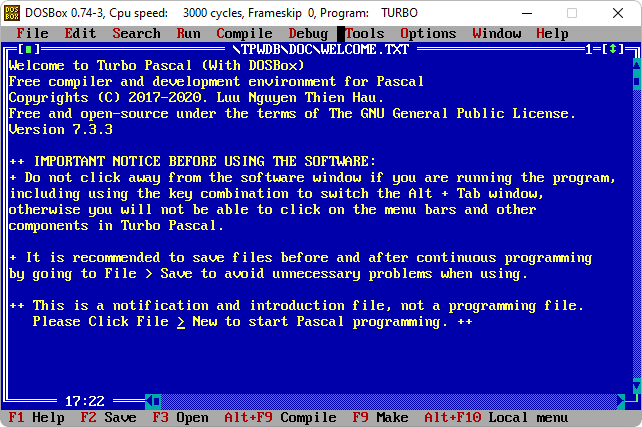
Turbo Pascal screenshot on DOSbox
Of course, things evolved from there. Delphi was the next step, then Visual Studio, and somehow my programming environment was kind of defined. This is how a programming environment should look like, and I still think that 90% of today’s IDEs are still copying that set of ideas today. But on Linux we had no Visual Studio, no Delphi - and even if I tried for a while to use XWPE (and even set it up for students while trying to convince teachers at the university to give Linux a chance). Later I would use Kate, KDevelop, QtCreator, and a bit of XEmacs and when I was forced to switch to Windows, Notepad++, or Visual Studio and customizations of Visual Studio for embedded development. Sad times.
No, I will not consider Netbeans or Eclipse proper editors. And while I tried for a while Atom, right in time to see it fail, Visual Studio Code was a real life-saver. But obviously, Microsoft decided to become Micr**0$**ft once more. And I don’t need to repeat the story about enshittification, do I? So, here I am, trying hard to choose an editor.
What makes an editor good?
Now this is very hard to decide. Most editors nowadays support a system proposed - or should I say, more correctly, imposed - by IBM, called CUA. Common User Access referred to multiple ways of doing things approached by various tools available on IBM PCs, and some ways in which programs would work in unexpected ways. What we know about using a computer, a lot of it might come from this CUA standards put forward by IBM. Stuff like resizing windows, field navigation with TAB, how menus work, why F5 refreshes and ALT-F4 closes a window comes from CUA.
The most important features for an editor that come from CUA are CTRL-Ins for Copy, SHIFT-Ins to Paste the copied text, and Shift-Del to Cut a selection. Selecting with Shift + movement is also inspired from CUA - and in the end the real shortcuts of CTRL-C/V/X and then CTRL-Z for undo and CTRL-Y for redo are also inspired from CUA. I haven’t read the standard, so I can’t say which are and which are not prescribed by CUA, but there is a way to do things, and this way worked well for me for all this time.
There are other ideas that come from CUA, regarding discoverability and accessibility. Functions of your programs should be accessible, and organized in a way that allows users to discover them. And, unfortunately, right now the best editor that does these things while being extensible is Visual Studio Code, so basically a proprietary open-source-ish product written in a subpar technology (Typescript, for all its tries, cannot fix Javascript). Notepad++ would be better still, but its ambitions are not aiming as high as VSCode’s, and that’s why it’s, well, a marginal editor.
And here I will have all the fans of the alternative editors yelling at me that I’m a mean person, like they did the last time. But CUA is an absurdely good standard, not because it made the perfect choices, but because those choices have been used and expected by users for over 35 years. And who are the vim people to complain about standards set many years ago, when hjkl comes from the limitation of Bill Joy’s keyboard, not from some God-handed scripture.
So, to conclude, what makes a good editor is, in my opinion, discoverability, and ease of use. The editor should not get in the way of the creator, but help them. With this perspective, let’s look at who are the participants in the truly modern editor war.
VI
Vi is a bad editor, and the fact that it is bad recommended it for what it is often used nowadays. It loads fast and allows editing of small files with no headaches, with little memory consumption, and it’s generally available on all Linux distributions to have a small editor installed. Vi has better alternatives with probably the best one being nano - which manages to be less confusing and more informative than vi with way less memory consumption and smaller footprint on disk. Nano is the perfect replacement for vi, and you should probably rarely if at all use vi for anything. And because it’s such a no-no, I won’t even explain here what vi is.
VIM
I bet that if they wouldn’t have seen this title coming right down the line, I would’ve had death threats in my inbox before posting the article. But where vi is bad, vi-improved really recycles the bad ideas and tries to center them around productivity. In vim hjkl is not the result of a random button mash but the divine inspiration of the God of computing, hjkl is the way to move around a file, the arrow keys are for people who are not serious about using a keyboard. Now, if you forgive my sarcastic remark let’s talk seriously about this impressive editor.
Vim is a modal editor, that means that there are multiple modes to interpret your keys, and typing into a file is only one of them, called INSERT. This is not the default mode, and that’s the most confusing part of the editor - to enter the insert mode you press i, and you can insert stuff in the file. Recent versions also allow arrow keys (recent by vi standards, which might mean “quite some time ago”) for navigation, but all the tutorials explain that you should not use them, they are fine for beginners to walk around but they should use hjkl because Bill Joy’s keyboard didn’t have arrow keys it’s more efficient.
It makes sense, up to a point. This choice makes navigation faster, but of course you can’t navigate through a file in INSERT mode with these keys. That means that going up two lines means that you press ESC, k, k, i to be back in INSERT mode and while people swear by this, I’m not convinced.
The power of VIM comes from NORMAL mode, which is the default. Here you can type instructions that can do a lot of things, functions that are implemented inside the editor, or by extensions written in VIMScript, a special language for configuring VIM. This is the toughest part of using this editor: VIMScript is arcane magic, and while some of us appreciate arcane magic, it cannot do everything and configuration it’s hard to understand and maintain, while also relying on obscure knowledge of how the editor works. I didn’t find a good VIM book, but that’s from me not looking - I’m pretty sure there are good VIM books, I just didn’t encounter them.
VIM tries to be a modern editor, but it is essentially a single-file terminal editor. Recent extensions try to change that, and this shortcoming mitigated by tiling editor instances or doing some sort of tricks. Also, the FAANG programming world embraced vim, and we’ll talk about this FAANG disease at the end of this chapter, but for the time being understand that the limitations of vim raised vim in the eyes of elite software developers that ended up making a lot of money in Silly-Con Valley. It’s an editor that saw most elite development involvement and evangelizing - a solution for the elites, not for the masses (like VSCode is).
I think (and I’m not being facetious here) that VIM is an amazing editor, that does wonders in the terminal. In a sense, I wish I could’ve learned using vim when I had more time to spare, because learning VIM and configuring VIM is a second job for the first 6 months of usage. I simply could not do it, I know enough how to use it, but everytime there’s a panic moment where I accidentally delete an entire page with a single shortcut I didn’t know it was one, and in the panic there’s no muscle memory to use the editor to save my life - and for those panic moments vim doesn’t offer the discoverability I need to reassure myself that I’m doing the right things to fix the thing that I messed up.
FAANG and vim
At one point of time there was a very intelligence-avoiding individual called TechLead that had a YouTube video about his advice to be a better programmer. His advice started with type very fast and went down from there. I won’t comment on the person, but this piece of advice made me think he was doing a humorous take on advice - until I saw multiple individual insisting that typing fast is an essential quality of a developer.
Now, I’ll probably die poor for this, but I never thought that typing fast is really a necessary quality. I’m a reasonable typist, but never felt that I needed to write vast swathes of code to be a good developer. In fact, I always described myself as a lazy developer, looking for a simple, less arcane, and more maintainable solution, as well as allowing myself time to think before typing. I don’t need to type some stupid code just to realize that it will be stupid, thinking about it first and writing it later was always a good strategy for me. Perhaps I’ll get back on the laziness aspect in a future article, let’s get back to the idea that typing fast is essential.
Now, speed comes at a cost. RSI (Repetitive Strain Injury) is one of the potential costs of the speed of typing, and RSI, carpal tunnel syndrome and others are not jokes. They are a sign that the human body is misused beyond its tolerances - while the human body is an amazing machine, it’s not made for this sort of usage. Simplistic take, I know, but RSI is the result of using your body wrong, repeatedly so, beyond the tolerances built in - and genetics and also abuse have a say in this.
Now the elite of the information technology was built in a special way akin to slavery, that probably needs a proper name. We don’t have yet the clarity that the distance in time offers us, but the productivity of Silicon Valley has been grown through induced self-exploitation and self-abuse, by stretching individuals to the limit and beyond. RSI is just a type of such abuse, and people have tried to „improve” this by limiting the movements that a hand does on the keyboard, so that the RSI would be less severe. Instead of saying „get away from your keyboard”, they say „no, keep smashing the keyboard, but do it on 1000$ keys and tight setups that your hand doesn’t move a lot”. I think this is the equivalent of saying „you could avoid accidents if you drive very fast, because you’ll stay less on the road, so higher speed improves your chances of survival”. I’ll not comment on that.
So the hjkl limitation was retrofitted into a virtue, and this was pushed as a solution for what otherwise would’ve mean usage of proper health protocols, improvement of quality of life. True quality of life is expensive, and we know what the money people think about the lives of their cattle.
The second thing that happened is that vim became the epitome of efficiency - it starts fast, it works only on terminals, it’s the elite tool for elite people. And the FAANG people really pushed this in everything. Even now you can navigate around with hjkl in the most unexpected places.
And you might complain about me insisting with that hjkl, but frankly, aside arcane configuration, an interesting way to issue commands and 50 years of features added in an inconsistent manner, vim doesn’t offer a lot.
Neovim
Neovim is the cool kid’s editor. Vim is amazing, neovim is amazing-er. Neovim seeks high compatibility with vim, but changes the configuration language to lua (excellent choice) and brings a lot more features to the table. I think there’s no good reason not to use neovim wherever you use vim, especially since it’s being actively developed, improved, and extensions for it evolve constantly. While this is merely a footnote, please note that neovim is a superior editor to vim and vi, and it improves constantly. But it will never be…
Emacs
I often wonder what informed the choices made in the 70s and 80s. I get the limitations of Bill Joy, because those were used as an excuse for decades by vim evangelists. I don’t know who Bill Joy is and I don’t care, but I know that he is a man with a keyboard that didn’t have arrow keys.
Emacs has a similar set of choices grown out of historical limitations. For a long time, while pushed and maintained by Richard Stallman, the controversial champion of open source software (a syntagm that he despises if I remember correctly), emacs has been the example used to explain „the cathedral style of development” in the famous „The Cathedral and the Bazaar”.
If someone ever argued that emacs is inferior to vi, emacs didn’t care much about the vitriol and moved on. Evolved. Improved. Waned. Returned to life. Reintegrated with itself (if we call XEmacs Emacs). Evolved further. Emacs never lost the editor war because it never fought it. People never need just an editor, emacs recognized early on. emacs had the responsibility to bring the entire functionality of your computer system at your fingertips.
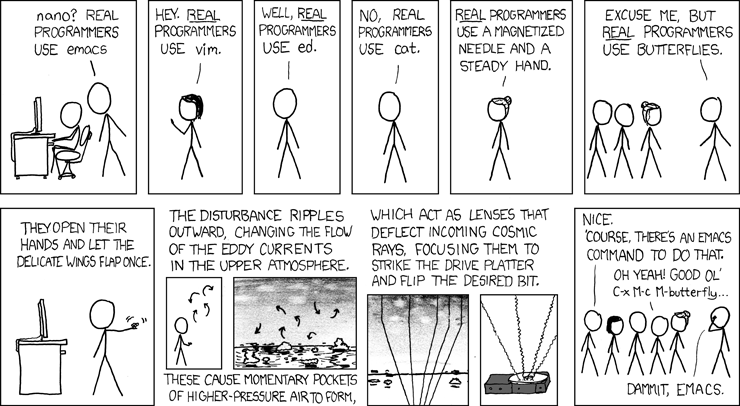
It took me quite some time to understand what is emacs’ deal. I think I finally understood, but first, allow me to misdirect you about this otherwise awesome editor. emacs is not a terminal file editor. It’s an operating interface that can be constrained to a terminal, or a single file, but it’s really a bit more.
Now, emacs has it’s own peculiarities, but can be configured easily to accommodate some of the issues a first timer might have. Menus are extensive, and show you a lot of what can be done with the editor. Emacs acts close to what an editor should act like, from a normal user’s point of view. But emacs is still not an editor for normies. It takes a lot of learning to get used to. The configuration, which is even more vital than on vi and variants, is written in elisp, a dialect of lisp. Lisp is generally considered an obsolete language, and I always made fun of it with a Romanian expansion of the four letters: „Limbaj Idiot cu Sistem de Paranteze” - „Idiotic Language with a Parenthesis System”. Count on Eastern Europeans to make proper fun of your sacred tool.
Emacs is a programable editor, with an important focus on the programmable part. You can create an amazing editor inside emacs. The default is passable and quirky, but the ability to program everything about emacs makes it amazing.
I would’ve been less upset at FAANG elite wankers if they promoted emacs instead of vim because emacs makes more proper use of your resources. Are you inside the terminal? I’ll offer you the best a terminal can do, without needing tmux or other hacks. Split windows? Check. Safe use in remote sessions? Sure, we have a server-client architecture that allows you to edit while your client disconnects, out of the box. You just need to start the emacs daemon and invoke the emacsclient instead. Do you have a GUI? We’ll use it! A mouse? Sure, let’s use that too. Do you want to do some complex operation here? Yes, you can, if you can LISP-it.
Where vi variants are limited, emacs transcends. Emacs is an even better vi - even better than neovim itself. Check-out doom-emacs if you really want a better vi. No need to install special fonts just to see some arrows in your editor. Emacs is a proper editing system, and the primordial IDE. Unfortunately, it doesn’t get the same attention and energy that vi evolutions do, mostly because the fanaticism of vi users is seen as productivity porn, while the fanaticism of emacs users was painted as backward thinking.
So emacs feels a bit behind these days. All it lacks is a proper editor. As always. It waits for you to write it in elisp.
Code/Codium
The third contender in this editor war and absolute winner until Microsoft makes it dogshit as per the enshittification directive that everyone in big tech seems to follow. Code sprung from the experiment of Atom, a configurable editor written in javascript (if I remember correctly). Maybe Atom lacked the love, expertise, and development power of a big tech firm. However, Atom never was able to be good enough - while competent, it was not amazing.
Now, Code is amazing. There is a lot of intelligence invested in this product, and for what it is - an editor written in the worst technological stack for performance - it moves and feels amazing. Code is a good editor first and foremost - it has a lot of good ideas, follows CUA and it’s the spiritual follower of „the editor part of VSCode 6, which is all that users really want”. One can configure it to do a lot of things, and everything is discoverable and a lot is configurable.
Microsoft also created for code the Language Server Protocol, which simply removed all the arcane ways that languages used to be supported by editors. Both (neo)vim and emacs take advantage of LSP, and offer LSP integration. Microsoft did this right.
However, code suffers from being Microsoft. The extensions, which is where the true power of the editor lies, are available via the Microsoft extensions store that is really prone to supply chain attacks, and rarely controlled. This is just one point where code might fail, but it’s pretty important, because now it’s easy to inject malware in otherwise secure setups by simply updating your editor to the latest version. And this is only the beginning. The undocumented telemetry, obligatory LLMs associations, and other bad practices make it a question mark everytime you open it.
With all these shortcomings, code is the most accessible, and discoverable editor. And we can talk about your complaints about it, but it’s absolutely smashing it. If we would stop the time to 1st of February 2026, we probably would have code as the absolute winner of the new editor war.
Other contenders
There are plenty other offerings, but code really set some standards, that even the other big alternatives (neovim and emacs) don’t offer out of the box in an intuitive manner. A good editor should not do unexpected things in unexpected ways - it should help you discover what you did wrong in it, and avoid the panic moments that could ruin your work. An editor should be a tool that helps you, not hinders your efforts, not an elitist „you must invest 6 months to be vaguely proficient”, but allow you to reuse knowledge from the rest of your computer operating tasks. And should be fast. And offer you project-based contextual tools (maybe even support more complex tools like devcontainers).
There are other editors that do some of these things. The default editing utilities from Qt or KDE would be a good example. QtCreator is a fully fledged IDE that can do a lot of things. Notepad++ is still alive, still doing amazing stuff. And I’m sure there’s a number of other editors I don’t know about, or haven’t mentioned, that are amazing.
But in the end it’s these three. Now, I think that the only thing that changed is that Microsoft added a lot of resources to improve an editor, and it’s fate is in their hand. They will decide if it survives this new editor war or not.
Emacs is amazing, but still needs a lot of love. Neovim gets a lot of that, and elitism as well. And to be honest, after looking closer to all these editors, I really want emacs to succeed. To evolve to the place where it is recognized as the unquestionable winner of this new editor war. Because emacs is really more than just an editor, and I prefer to not have the Microsoft shareholder decide the fate of my editor.
PS: I’ve been informed that vim now has tabs, splits and windows. It’s fine, it tries very hard to be emacs, but it just cannot be emacs until it really drops the terminal hard dependency. Emacs is a better vim anyway. Also, I hear that FAANG also uses emacs and vim in the same amount, and maybe it just means that I wrote slander at the address of FAANG in this case by suspecting that they contribute a lot more than the rest of the people to the vim ecosystem. I might be wrong. But this blog is my opinion. I might be wrong anyway, from head to toes.
This is just… like… my opinion, man!